 7b39cf98d5
* [Themes] Add identity default palettes for the image themes The Fabric, Leather, Plasma and VelvetMarble themes shipped only zone art and no palette, so their chrome fell back to the bare OS palette. Each theme now ships light and dark curated defaults written in the palette editor's own conventions, with [AppColors] so the home-tab buttons keep the theme's identity over static backgrounds. - Add palette-default-light.toml / palette-default-dark.toml for the four themes; scheme resolution follows the OS since the themes declare no color scheme. - Tint the window/base/button chrome and bevels towards each theme's identity: navy cloth (Fabric), black-brown with brass accents (Leather), electric violet with cyan sparks (Plasma), charcoal velvet with slate marble (VelvetMarble). - Fill [AppColors] AccentStrong / AccentSoft per theme so the home-tab button gradient matches instead of falling back to the default greens. - Derive Disabled and Inactive groups with the same conventions as PaletteGenerator::fromAccent. * [Themes] Add home backgrounds for the image themes * [Themes] Ship Fusion style + scheme backgrounds for the image themes Address PR review: - Add theme.cfg ([Style] Name = Fusion, ColorScheme = System) to Fabric, Leather, Plasma and VelvetMarble so their curated palettes actually apply. Without it the native style paints button chrome from the OS (windowsvista on Windows has no dark mode), making the dark palettes' light ButtonText unreadable on light buttons. - Leverage the scheme-variant asset resolution: register home-dark.png and home-light.png in resources and add them to the qrc so the built-in home background also flips with the palette instead of staying static. - Fix Leather [Palette.Inactive] Accent, which copied the Active Highlight color instead of the theme accent (dark #4a5f8f -> #c9995a, light #34508c -> #a5712f) in both palette files. * [Themes] Align light plasma home background with the dark variant Recolored the Plasma light home background to mirror the dark one: brighter violet/cyan blooms, vivid azure spark arcs, and higher accent saturation against the same pale-lavender key. Brightness is unchanged so it still reads as a light scheme. * [Home] Add option to disable the home tab background dim Adds a 'Dim the home tab background' checkbox to the Home tab settings page (Appearance). When unchecked, HomeWidget skips the translucent black overlay it paints over the whole background. Default is on, preserving current behavior; the home tab repaints live on change. * Update leather backgrounds * Update velvet marble backgrounds * Update light plasma background * Update light fabric background * WIP [UI] Theme-aware onboarding banner with frosted light mode Banner colours now derive from palette tokens at ~60fps (tick-driven, equality-guarded setters) so scheme switches and live accent-picker previews apply instantly: - dark stages: byte-for-byte the original treatment (near-black stage from window hue, Highlight accent, white centre halo, vignette 0.62) - light stages: pastel accent-hue wash instead of a neutral grey copy, brightness-lifted accent for additive glow legibility, deep-Highlight halo (uGlowColor) instead of white blowout, gentler vignette (uVignetteMin 0.88) so corners don't go muddy - black logo silhouette variant selected on light stages - theme picker preseeded with brand green (brand_colors.h single source) WIP notes for next session: - real-pixel wizard screenshot check still pending (headless capture exists: Xvfb :77 + isolated XDG_DATA_HOME; shader vs fallback pixel analysis not finished) - user plans separately: promote Fusion to default theme, Default -> system * [Themes] Align Fusion accent tokens with the SVG brand gradient Align AccentStrong (#139740) and AccentSoft (#c9fd62) and the linked Link/Accent roles with cockatrice.svg's linearGradient4265-7-8 stops so the identity gradient used by the logo emulation matches the static art the icon shipped. * [Onboarding] Draw the banner logo as a static gradient plate Replace the black/white logo tint switch with a ShaderEffect plate that repaints the SVG's brand gradient (light AccentSoft -> dark AccentStrong along the baked-in userSpaceOnUse axis) clipped to the full-color logo's alpha silhouette, with the white highlight path overlaid on top — matching the home widget's QPainter composite. The plate is static: no glow or breathing. Brand colors flow from BannerShaderConfig's new brandStrong/ brandSoft pair instead of the removed logoDark flag, and the background motifs get a touch more accent so the mark keeps its coloured surround. * [Home] Draw the featured logo as a theme gradient composite Repaint cockatrice.svg in Qt instead of showing the baked-in static art: fill the full-color logo's alpha silhouette with the same brand gradient the banner plate uses (light AccentSoft grading to dark AccentStrong along the SVG's userSpaceOnUse axis), then overlay the white highlight path. Renders an explicit QPixmap so the mark stays crisp at the 200px display size, and re-seeds it on theme/palette/appearance changes so it never goes stale. * [Resources] Drop the unused black logo asset No consumer remains after the banner's logoDark toggle was replaced by the static gradient plate (unit-tested in d7529e0c6a), so remove cockatrice-logo-black.svg and its qrc entry. * [Onboarding] Seed the theme picker from the theme's identity accent Replace the hardcoded brand-green preseed with the shipped theme's own AccentStrong (Plasma seeds violet, Fusion green), resolved from the default palette so auto/user-generated palettes can't mask it, and re-seed whenever the theme changes so the swatch never goes stale. Also consult the shipped palette in maybeAutoGeneratePalette so scheme flips don't regenerate a fresh palette over curated theme colors. * Regenerate zone assets for Fabric, Leather, VelvetMarble themes Align zone textures with each theme's palette identity: - Fabric: linen weave in navy/steel tones (was generic green/blue/red/gray) - Leather: grain texture in warm brown/amber tones - VelvetMarble: smooth charcoal marble veining (replaces .jpg with .png) All zones now have dark + light scheme variants for OS color scheme adaptation. Plasma zones deferred to separate iteration. * Regenerate Plasma zone assets: horizontal-hand layout, seamless tiling Bake each zone's phase from its true world position in the horizontal-hand layout (player 0, stack 172, table 280, hand 172+406) so the diagonal sheen continues continuously across zone boundaries. All zones share one mathematically tileable (1,1) diagonal at frequency 3; playerzone gets a distinct blue-violet identity and the light scheme gets extra contrast. * Regenerate VelvetMarble zones: classic Perlin marble, seamless tiling * Regenerate VelvetMarble zones: domain-warped fractal veins, stone grain * Promote Fusion to default theme, rename Default to System Fresh installs and new profiles now default to the Fusion (dark) theme instead of the platform-native theme. The old "Default" theme is renamed "System" to better describe its purpose — using the OS-native Qt style (windowsvista, macOS, etc.). Existing users who had "Default" selected are automatically migrated to "System" so they keep their platform-native styling. Users with an empty or invalid theme name now fall back to Fusion. * Move checkbox. --------- Co-authored-by: Lukas Brübach <Bruebach.Lukas@bdosecurity.de> |
||
|---|---|---|
| .ci | ||
| .github | ||
| .tx | ||
| cmake | ||
| cockatrice | ||
| doc | ||
| libcockatrice_card | ||
| libcockatrice_deck_list | ||
| libcockatrice_filters | ||
| libcockatrice_interfaces | ||
| libcockatrice_models | ||
| libcockatrice_network | ||
| libcockatrice_protocol | ||
| libcockatrice_rng | ||
| libcockatrice_settings | ||
| libcockatrice_utility | ||
| oracle | ||
| servatrice | ||
| tests | ||
| vcpkg@9e593bb18e | ||
| .clang-format | ||
| .cmake-format.json | ||
| .dockerignore | ||
| .gitignore | ||
| .gitmodules | ||
| CMakeLists.txt | ||
| docker-compose.yml | ||
| docker-compose.yml.windows | ||
| Dockerfile | ||
| Doxyfile | ||
| format.sh | ||
| LICENSE | ||
| README.md | ||
| shell.nix | ||
| vcpkg.json | ||

Cockatrice | Download | Related | Community | Contribute | Build | Run
To get started with Cockatrice ⇢ view our webpage

To get support, or suggest changes to the app ⇢ file an issue (How?)
To help with development ⇢ learn how to contribute
Cockatrice
Cockatrice is an open-source, multiplatform application for playing tabletop card games over a network. The program's server design prevents users from manipulating the game for unfair advantage. The client also provides a single-player mode, which allows users to brew while offline.
This project uses C++ and the Qt libraries.
Download 
Downloads are available for stable releases and the current beta version in development.
There is no strict release schedule for either of them.
Latest stable release:


Latest beta version:


While incorporating the latest fixes and features, beta builds may not be stable or contain new bugs! Please report any findings and open new issues when testing them!
Related Repositories
- Magic-Token: File with MtG token data for use in Cockatrice
- Magic-Spoiler: Code to generate MtG spoiler data from MTGJSON for use in Cockatrice
- cockatrice.github.io: Code of the official Cockatrice webpage
- io.github.Cockatrice.cockatrice: Configuration of our Linux
flatpakpackage hosted at Flathub - Webatrice: Web client for Cockatrice servers (TypeScript / React)
Community Resources 
Join our Discord community to connect with other project contributors (#dev channel) or fellow users of the app. Come here to talk about the application, features, or just to hang out.
Important
For support regarding specific servers, please contact that server's admin/mods and use their dedicated communication channels rather than contacting the team building the software.
Contribute
Code | Documentation | Translation
Repository Activity
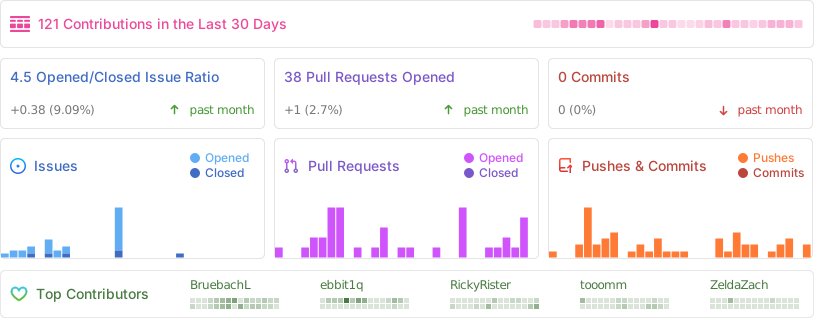
Code
To contribute code to the project, please review our guidelines first.
We maintain two tags for contributors to easier find issues to potentially work on:
Issues tagged in this way provide a simple way to get started. They don't require much experience to be worked on.
This tag is used for issues that we are looking for somebody to pick up. Often this is for feature suggestions we support, but don't have the time to work on ourselves.


For both tags, we're willing to provide help to contributors in showing them where and how they can make changes, as well as code reviews for submitted changes.
We'll happily advice on how best to implement a feature, or we can show you where the codebase is doing something similar before you get too far along - put a note on an issue you want to discuss more on!
You can also have a look at our Todo List in our Code Documentation or search the repo for \todo comments.
Documentation 
There are various places where useful information for different needs are maintained:
- Official Code Documentation
- Official Wiki
Community supported - Official Webpage
- Official README
This file
Cockatrice tries to use the Google Developer Documentation Style Guide to ensure consistent documentation. We encourage you to improve the documentation by suggesting edits based on this guide.
Translation 
Cockatrice uses Transifex to manage translations. You can help us bring Cockatrice and Oracle to your language and just adjust single wordings right from within your browser by visiting our Transifex project page. The Webatrice web client manages its own translations in its repo.
Check out our Translator FAQ for more information about getting involved, and join a group of hundreds of others!
Build 

Dependencies: (for minimum versions search our CMake file)
Oracle can optionally use some packages to load compressed card files:
Basic compilation steps:
mkdir build
cd build
cmake ..
make
You can then
- Create a Cockatrice installation inside the
releasefolder:make install - Or make an installation package specific to your system:
make package
Note
Detailed compiling instructions can be found in the Cockatrice wiki at Compiling Cockatrice
The following flags (with their non-default values) can be passed to cmake:
| Flag | Description |
|---|---|
-DWITH_SERVER=1 |
Build Servatrice server |
-DWITH_CLIENT=0 |
Don't build Cockatrice client |
-DWITH_ORACLE=0 |
Don't build Oracle card database tool |
-DCMAKE_BUILD_TYPE=Debug |
Compile in debug mode Enables extra logging output, debug symbols, and much more verbose compiler warnings |
-DWARNING_AS_ERROR=0 |
Don't treat compilation warnings as errors in debug mode |
-DUPDATE_TRANSLATIONS=1 |
Configure make to update the translation .ts files for new strings in the source codeNote: make clean will remove the .ts files |
-DTEST=1 |
Enable regression tests Note: make test to run tests, googletest will be downloaded if not available |
Run
Cockatrice is the game client
Oracle fetches card data
Servatrice is the server
Docker
You can build an image & deploy a Servatrice (Cockatrice server) container using Docker and our Dockerfile yourself.
For more details, look into our wiki section on Setting up Servatrice.
You'll also find more hints on our pre-build image there, or the docker-compose file which will configure and run both a MySQL server and Servatrice.
License 
Cockatrice is free software, licensed under the GPLv2.