 ba2900dcb9
* [DeckShare] Create temporary share links for local and server decks

* [DeckShare] Address review findings and harden the share flows

Gate every share entry point on login, de-duplicate the share-link and
color-identity logic behind DeckShareUtils and an injected querier, and
replace the silent tray/status-bar notices with always-visible dialogs.

- abstract_tab_deck_editor: explain that sharing requires a connection
  instead of silently doing nothing when logged out
- tab_deck_storage: disable the share action on disconnect, reject
  folder/deck mixes and the root folder with clear warnings, re-enable
  Create on every entry/response so a dropped connection cannot leave
  the button disabled
- tab_deck_storage_visual: same login gate for the context-menu entry,
  visible success/error dialogs, and a symmetric in-flight guard
- getDeckColorIdentity now takes a CardDatabaseQuerier, dropping the
  CardDatabaseManager singleton access and enabling unit tests

* [DeckShare] Fix share-link expiry build on the minimum-supported Qt

QTimeZone::UTC (the Initialization enum) only exists since Qt 6.7, so
Debian 12 and Ubuntu 24.04 (Qt 6.4) fail to compile the share-link expiry
handling in the share dialog and the two deck-storage tabs. Mirror the
existing games_model guard and fall back to Qt::UTC on older Qt.

* [DeckShare] Use the stable server client for the visual deck storage tab

* [DeckShare] Extract the share-creation response handling into DeckShareUtils

* [DeckShare] Drop includes left unused by the share-response extraction

* [DeckShare] Format share expiry with the locale-aware short format

* [DeckShare] Build share links with QUrl and QUrlQuery for percent-encoding

* [DeckShare] Replace the duplicate computeColorIdentity with the shared getDeckColorIdentity

* [DeckShare] Recover the share controls when the server never answers

* [DeckShare] Provide the full share hint in each plural form

* [DeckShare] Join the selected-count label with a non-translatable separator

* [DeckShare] Retranslate the share button tooltip with the storage widget

* [DeckShare] Forward retranslateUi to the visual deck storage widget

* [DeckShare] Let the share bar owners supply the hint text

* [DeckShare] End the share-related headers and sources with a trailing newline

* [DeckShare] Keep the settings include in the project include block

* [DeckShare] Include the network settings header used by the share timeout

* [DeckShare] Resolve the share theme icon through themePixmap

QPixmap("theme:icons/share") has no file extension, so ThemeManager::assetPath()
is bypassed and the pixmap is always null. Use themePixmap(QStringLiteral("icons/share"))
like every other toolbar action, so the .svg (and dark/light variants) resolves.

* [DeckShare] Keep the share selection consistent with the visible decks

Filtered-out previews are hidden but kept alive, so selectedFilePaths() counted
them in the share and the selection highlight. Only decks the user can see are
now shared, and a deck that stops matching the filters is deselectd as the deck
pass runs, keeping the %n count and the highlight in sync with the screen.

* [DeckShare] Abandon an in-flight tree share on cancel

Leaving share mode never stopped the timeout timer, and a late response still
ran shareFromTreeFinished, copying the link and announcing success for a share
the user backed out of. Stopping the timer and tracking the outstanding request
by sequence number means a stale reply (or a timed-out one) after cancel is
ignored, and cancelling + re-entering share mode can no longer confuse the two
requests.

* [DeckShare] Abandon an in-flight tile share on cancel

exitShareMode() left shareTimeoutTimer running and did not abandon the pending
Command_DeckShareCreate, so a timer pop or a late success still reported the
share after the user cancelled. Stop the timer and ignore stale responses via a
sequence number, mirroring the tree tab.

* [DeckShare] Wire the status-changed handler after shareBar exists

handleConnectionChanged() dereferences shareBar->isVisible(), but the connection
was set up before shareBar was constructed and shareBar had no in-class
initializer. On any status change delivered before construction the slot read an
indeterminate pointer. Seed the connection (and the initial share availability)
after shareBar exists and give shareBar a = nullptr initializer.

* [DeckShare] Explain why a blank deck cannot be shared

A blank deck exited the share flow silently. The menu only disables the entry
via setSaveStatus(), a different predicate, so the path is reachable (e.g. add a
card and remove it again). Mirror the not-logged-in branch with a short
information dialog.

* [DeckShare] Restore the banner-text doc comment

Re-add the doc block above refreshBannerCardText() that was removed as part of
the share-selection work; it documents the coupling to refreshBannerCardToolTip.

* [DeckShare] Resolve the stable server client in the deck editor gate

actShareDeck went through tabSupervisor->getClient(), which hands back a
LocalClient while an offline game is running. LocalClient never sets its status,
so a logged-in user could not share from the deck editor during a local game,
and got a misleading "You must be connected" message. Expose the supervisor's
stable remote client and use it for the gate and the dialog, matching the other
share tabs.

---------

Co-authored-by: Lukas Brübach <Bruebach.Lukas@bdosecurity.de>
|
||
|---|---|---|
| .ci | ||
| .github | ||
| .tx | ||
| cmake | ||
| cockatrice | ||
| doc | ||
| libcockatrice_card | ||
| libcockatrice_deck_list | ||
| libcockatrice_filters | ||
| libcockatrice_interfaces | ||
| libcockatrice_models | ||
| libcockatrice_network | ||
| libcockatrice_protocol | ||
| libcockatrice_rng | ||
| libcockatrice_settings | ||
| libcockatrice_utility | ||
| oracle | ||
| servatrice | ||
| tests | ||
| vcpkg@9e593bb18e | ||
| .clang-format | ||
| .cmake-format.json | ||
| .dockerignore | ||
| .gitignore | ||
| .gitmodules | ||
| CMakeLists.txt | ||
| docker-compose.yml | ||
| docker-compose.yml.windows | ||
| Dockerfile | ||
| Doxyfile | ||
| format.sh | ||
| LICENSE | ||
| README.md | ||
| shell.nix | ||
| vcpkg.json | ||

Cockatrice | Download | Related | Community | Contribute | Build | Run
To get started with Cockatrice ⇢ view our webpage

To get support, or suggest changes to the app ⇢ file an issue (How?)
To help with development ⇢ learn how to contribute
Cockatrice
Cockatrice is an open-source, multiplatform application for playing tabletop card games over a network. The program's server design prevents users from manipulating the game for unfair advantage. The client also provides a single-player mode, which allows users to brew while offline.
This project uses C++ and the Qt libraries.
Download 
Downloads are available for stable releases and the current beta version in development.
There is no strict release schedule for either of them.
Latest stable release:


Latest beta version:


While incorporating the latest fixes and features, beta builds may not be stable or contain new bugs! Please report any findings and open new issues when testing them!
Related Repositories
- Magic-Token: File with MtG token data for use in Cockatrice
- Magic-Spoiler: Code to generate MtG spoiler data from MTGJSON for use in Cockatrice
- cockatrice.github.io: Code of the official Cockatrice webpage
- io.github.Cockatrice.cockatrice: Configuration of our Linux
flatpakpackage hosted at Flathub - Webatrice: Web client for Cockatrice servers (TypeScript / React)
Community Resources 
Join our Discord community to connect with other project contributors (#dev channel) or fellow users of the app. Come here to talk about the application, features, or just to hang out.
Important
For support regarding specific servers, please contact that server's admin/mods and use their dedicated communication channels rather than contacting the team building the software.
Contribute
Code | Documentation | Translation
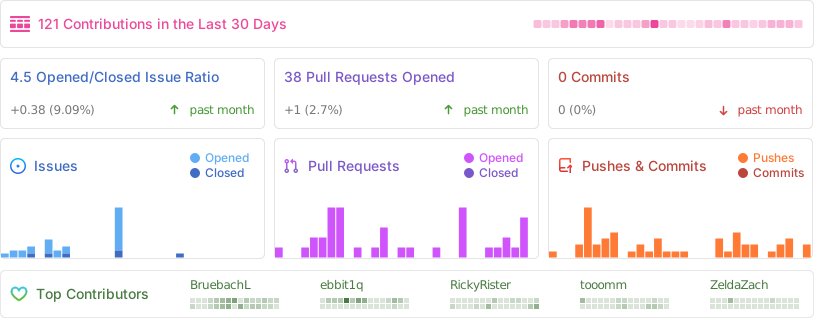
Repository Activity
Code
To contribute code to the project, please review our guidelines first.
We maintain two tags for contributors to easier find issues to potentially work on:
Issues tagged in this way provide a simple way to get started. They don't require much experience to be worked on.
This tag is used for issues that we are looking for somebody to pick up. Often this is for feature suggestions we support, but don't have the time to work on ourselves.


For both tags, we're willing to provide help to contributors in showing them where and how they can make changes, as well as code reviews for submitted changes.
We'll happily advice on how best to implement a feature, or we can show you where the codebase is doing something similar before you get too far along - put a note on an issue you want to discuss more on!
You can also have a look at our Todo List in our Code Documentation or search the repo for \todo comments.
Documentation 
There are various places where useful information for different needs are maintained:
- Official Code Documentation
- Official Wiki
Community supported - Official Webpage
- Official README
This file
Cockatrice tries to use the Google Developer Documentation Style Guide to ensure consistent documentation. We encourage you to improve the documentation by suggesting edits based on this guide.
Translation 
Cockatrice uses Transifex to manage translations. You can help us bring Cockatrice and Oracle to your language and just adjust single wordings right from within your browser by visiting our Transifex project page. The Webatrice web client manages its own translations in its repo.
Check out our Translator FAQ for more information about getting involved, and join a group of hundreds of others!
Build 

Dependencies: (for minimum versions search our CMake file)
Oracle can optionally use some packages to load compressed card files:
Basic compilation steps:
mkdir build
cd build
cmake ..
make
You can then
- Create a Cockatrice installation inside the
releasefolder:make install - Or make an installation package specific to your system:
make package
Note
Detailed compiling instructions can be found in the Cockatrice wiki at Compiling Cockatrice
The following flags (with their non-default values) can be passed to cmake:
| Flag | Description |
|---|---|
-DWITH_SERVER=1 |
Build Servatrice server |
-DWITH_CLIENT=0 |
Don't build Cockatrice client |
-DWITH_ORACLE=0 |
Don't build Oracle card database tool |
-DCMAKE_BUILD_TYPE=Debug |
Compile in debug mode Enables extra logging output, debug symbols, and much more verbose compiler warnings |
-DWARNING_AS_ERROR=0 |
Don't treat compilation warnings as errors in debug mode |
-DUPDATE_TRANSLATIONS=1 |
Configure make to update the translation .ts files for new strings in the source codeNote: make clean will remove the .ts files |
-DTEST=1 |
Enable regression tests Note: make test to run tests, googletest will be downloaded if not available |
Run
Cockatrice is the game client
Oracle fetches card data
Servatrice is the server
Docker
You can build an image & deploy a Servatrice (Cockatrice server) container using Docker and our Dockerfile yourself.
For more details, look into our wiki section on Setting up Servatrice.
You'll also find more hints on our pre-build image there, or the docker-compose file which will configure and run both a MySQL server and Servatrice.
License 
Cockatrice is free software, licensed under the GPLv2.