 c7e8422808
Some checks are pending
CodeQL / Analyze (cpp) (push) Waiting to run
CodeQL / Analyze (actions) (push) Waiting to run
Build Desktop / Configure (push) Waiting to run
Build Desktop / vcpkg baseline (push) Waiting to run
Build Desktop / Debian 13 (push) Blocked by required conditions
Build Desktop / Fedora 45 release (push) Blocked by required conditions
Build Desktop / Fedora 45 debug (push) Blocked by required conditions
Build Desktop / Servatrice_Debian 12 (push) Blocked by required conditions
Build Desktop / Ubuntu 26.04 (push) Blocked by required conditions
Build Desktop / Arch (push) Blocked by required conditions
Build Desktop / Debian 12 (push) Blocked by required conditions
Build Desktop / Fedora 44 (push) Blocked by required conditions
Build Desktop / Ubuntu 24.04 (push) Blocked by required conditions
Build Desktop / Ubuntu 26.04 sanitize (push) Blocked by required conditions
Build Desktop / Ubuntu 26.04 cover (push) Blocked by required conditions
Build Desktop / macOS 14 (push) Blocked by required conditions
Build Desktop / macOS 15 (push) Blocked by required conditions
Build Desktop / macOS 27 Debug (push) Blocked by required conditions
Build Desktop / Windows 10 (push) Blocked by required conditions
Build Desktop / macOS 13 Intel (push) Blocked by required conditions
Build Desktop / Prune caches (push) Waiting to run
Build Docker / Servatrice (arm) (push) Waiting to run
Build Docker / Servatrice (x86) (push) Waiting to run
Build Docker / Publish multi-platform Servatrice image (push) Blocked by required conditions
* [Icons] Author icon emphasis colors as palette roles The emphasis levels were computed from the accent at paint time, so a theme could not vary them: every theme got the same derived strong and soft tones, and a semantic hue was pushed toward the accent whether the author wanted that or not. Give each family three authored roles instead. Icon/IconStrong/IconSoft carry the neutral glyph ink and Positive/Negative gain the same Strong and Soft companions. Emphasis becomes a lookup inside the family, and a caller that names a variant pins that level at every emphasis. The paint path returns the authored color verbatim; only the filled treatments keep their saturation floor, because carrying a disc or a fill is a treatment decision. Shipped palettes author the full ladder for both schemes; the palette editor exposes the new rows and the generator writes them. System keeps deriving its neutral ink from the platform palette, since it ships no palette of its own. * [Icons] Keep the authored emphasis in filled treatments The saturation floor was added while the emphasis levels were still computed: it rescued the pale dark-scheme tones once a whole shape carried them. With the levels authored, the floor overrides the author instead: a quiet level jumped to the secondary saturation as soon as a sticker or a badge painted it, so the ladder only existed for line glyphs. The authored tone is now the top of the fill gradient and the treatment only darkens the bottom for depth, so every treatment renders exactly the level the palette stores. The badge glyph ink no longer guesses the scheme from the tone's value: an authored quiet level is a dark color on the dark scheme too, so the scheme is passed in from the surface palette. The preview sheet renders every shipped palette theme, three glyphs per family, and each row prints the authored tone and the darker bottom. * [Icons] Order the emphasis ladder by chroma, not contrast Contrast cannot order the ladder. On a dark surface the highest-contrast tone is the palest one, so a 7:1 primary came out near-white while the secondary kept the family's color; the ladder read inverted, and for the shipped semantic greens and reds the primary level was already satisfied by the secondary, so the two levels resolved to the same hex. Emphasis is chromatic intensity now. Quiet recedes toward the surface at the 3:1 non-text floor, secondary keeps the family color at the 4.5:1 text floor, and primary is the most chromatic tone the same floor allows. Every level stays legible on the window and the button surface, and the primary is a strictly more saturated member of its family on both schemes. The reformatted palettes move the two upper levels onto the shared floor and leave the quiet level alone. * [Icons] Make the emphasis ladder structural on every theme The chroma ladder landed with four P1s from review: reachContrast picked its pole by background lightness instead of by what each pole can reach, the generated neutral ink was solved on the window surface only, Fusion's neutral family was still the green accent, and quiet sat below the text floor while disabled reused the palette gray. Pick the pole by achievable contrast, solve fallback and preview inks on the harder of the window and button surfaces, re-author Fusion's neutral trio in slate blue, and keep quiet on the shared text floor by muting its saturation to 45% instead of blending it into the surface. Disabled is now derived from the quiet ink, so it is structurally dimmer than every enabled level on every theme. Re-author all soft roles at a 4.60 target with a rounding margin, rebuild the per-theme preview generator the rebase dropped, and add a Disabled row to every treatment sheet. * [Icons] Render preview glyphs at the sheet's device pixel ratio The preview sheets paint on a 2x painter but rasterized each glyph at its logical size, so every icon was upscaled on the way into the file and the sheets read as blurry. Render each glyph at device size and tag the pixmap with the ratio, so one source pixel lands on one file pixel. * [Icons] Keep the System semantic ladder on the text floor System authors no palette of its own, so its semantic family is fixed data measured against whatever surfaces the platform provides. The ladder that landed with the authored roles reused the old contrast-ordered values: PositiveSoft and NegativeSoft sat at 2.76–3.90:1 on common light and dark platform surfaces, and the strong level was less saturated than the secondary, which is the inversion the chroma rule removes. Re-author the six default semantic colors per scheme at the same 4.60 target the shipped themes use, against representative platform surfaces, and mirror them in System's palette files. The new DefaultSemanticFamilyMeetsTheLadderOnPlatformSurfaces test holds the floor and the saturation order there, and shippedPalette's early return now says why System is outside the authored-palette assertions. * [Icons] Apply the CI clang-format output to the new tests * [Icons] Adapt the treatment preview to the authored roles The preview file is inherited from the treatment PR. Here the palette already authors the fill tone and the badge takes an explicit scheme, so the generator stops re-saturating the role and passes the scheme the sheet renders. * [Icons] Author neutral System icon ink The System theme derived icon ink from the platform palette, which rendered blue under the default palette. Author Icon/IconStrong/IconSoft explicitly: a black ladder in light mode, a white ladder in dark mode. Pin authorship, achromaticity and ordering in the render test. * Address review findings |
||
|---|---|---|
| .ci | ||
| .github | ||
| .tx | ||
| cmake | ||
| cockatrice | ||
| docs | ||
| external | ||
| libcockatrice_card | ||
| libcockatrice_deck_list | ||
| libcockatrice_filters | ||
| libcockatrice_game | ||
| libcockatrice_interfaces | ||
| libcockatrice_models | ||
| libcockatrice_network | ||
| libcockatrice_protocol | ||
| libcockatrice_rng | ||
| libcockatrice_settings | ||
| libcockatrice_utility | ||
| oracle | ||
| servatrice | ||
| Testing | ||
| tests | ||
| tools | ||
| vcpkg@9eec002df1 | ||
| .clang-format | ||
| .cmake-format.json | ||
| .dockerignore | ||
| .gitignore | ||
| .gitmodules | ||
| CMakeLists.txt | ||
| docker-compose.yml | ||
| docker-compose.yml.windows | ||
| Dockerfile | ||
| Doxyfile | ||
| format.sh | ||
| gcovr.cfg | ||
| iwyu.sh | ||
| LICENSE | ||
| publish_beta.sh | ||
| qt6.imp | ||
| README.md | ||
| shell.nix | ||
| vcpkg.json | ||

Cockatrice | Download | Related | Community | Contribute | Build | Run
To get started with Cockatrice ⇢ view our webpage
To get support, or suggest changes to the app ⇢ file an issue (How?)

To learn about the app and its code ⇢ read our code documentation
To help with development ⇢ learn how to contribute
Cockatrice
Cockatrice is an open-source, multiplatform application for playing tabletop card games over a network. The program's server design prevents users from manipulating the game for unfair advantage. The client also provides a single-player mode, which allows users to brew while offline.
This project uses C++ and the Qt libraries.
Download 
Downloads are available for stable releases and the current beta version in development.
There is no strict release schedule for either of them.
Latest stable release:


Latest beta version:


While incorporating the latest fixes and features, beta builds may not be stable or contain new bugs! Please report any findings and open new issues when testing them!
Related Repositories
- Magic-Token: File with MtG token data for use in Cockatrice
- Magic-Spoiler: Code to generate MtG spoiler data from MTGJSON for use in Cockatrice
- cockatrice.github.io: Code of the official Cockatrice webpage
- io.github.Cockatrice.cockatrice: Configuration of our Linux
flatpakpackage hosted at Flathub - Webatrice: Web client for Cockatrice servers (TypeScript / React)
Community Resources 
Join our Discord community to connect with other project contributors (#dev channel) or fellow users of the app. Come here to talk about the application, features, or just to hang out.
Important
For support regarding specific servers, please contact that server's admin/mods and use their dedicated communication channels rather than contacting the team building the software.
Contribute
Code | Documentation | Translation
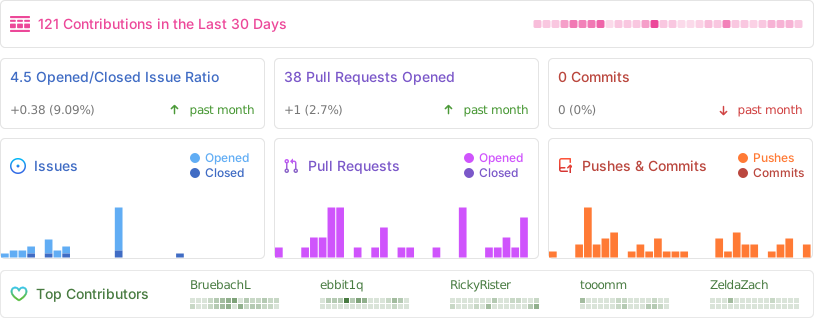
Repository Activity
Code
To commit code to the project, please review our Contribution Guidelines first.
We maintain two tags for contributors to easier find issues to potentially work on:
Issues tagged in this way provide a simple way to get started. They don't require much experience to be worked on.
This tag is used for issues that we are looking for somebody to pick up. Often this is for feature suggestions we support, but don't have the time to work on ourselves.


For both tags, we're willing to provide help to contributors in showing them where and how they can make changes, as well as code reviews for submitted changes.
We'll happily advice on how best to implement a feature, or we can show you where the codebase is doing something similar before you get too far along - put a note on an issue you want to discuss more on!
You can also have a look at our Todo List in our Code Documentation or search the repo for \todo comments.
Documentation 
There are various places where useful information for different needs are maintained:
- Official Code Documentation
- Official Wiki
Community supported - Official Webpage
- Official README
This file - Official CONTRIBUTING
Cockatrice tries to use the Google Developer Documentation Style Guide to ensure consistent documentation.
We encourage everybody to improve the documentation by suggesting edits based on this guide.
Translation 
Cockatrice uses Transifex to manage translations. You can help us bring Cockatrice and Oracle to your language and just adjust single wordings right from within your browser by visiting our Transifex project page. The Webatrice web client manages its own translations in its repo.
Check out our Translator FAQ for more information about getting involved, and join a group of hundreds of others!
Build 

Dependencies: (for minimum versions search our CMake file)
Oracle can optionally use some packages to load compressed card files:
Basic compilation steps:
mkdir build
cd build
cmake ..
make
You can then
- Create a Cockatrice installation inside the
releasefolder:make install - Or make an installation package specific to your system:
make package
Note
Detailed compiling instructions can be found in the Cockatrice wiki at Compiling Cockatrice
The following flags (with their non-default values) can be passed to cmake:
| Flag | Description |
|---|---|
-DWITH_SERVER=1 |
Build Servatrice server |
-DWITH_CLIENT=0 |
Don't build Cockatrice client |
-DWITH_ORACLE=0 |
Don't build Oracle card database tool |
-DCMAKE_BUILD_TYPE=Debug |
Compile in debug mode Enables extra logging output, debug symbols, and much more verbose compiler warnings |
-DWARNING_AS_ERROR=0 |
Don't treat compilation warnings as errors in debug mode |
-DUPDATE_TRANSLATIONS=1 |
Configure make to update the translation .ts files for new strings in the source codeNote: make clean will remove the .ts files |
-DTEST=1 |
Enable regression tests Note: make test to run tests, googletest will be downloaded if not available |
Tip
Build code documentation (Doxygen) according to our configuration into
/docs-output:doxygen Doxyfile
Run
Cockatrice is the game client
Oracle fetches card data
Servatrice is the server
Docker
You can build an image & deploy a Servatrice (Cockatrice server) container using Docker and our Dockerfile yourself.
For more details, look into our wiki section on Setting up Servatrice.
You'll also find more hints on our pre-build image there, or the docker-compose file which will configure and run both a MySQL server and Servatrice.
License 
Cockatrice is free software, licensed under the GPLv2.