 fa8220df3c
* [Client] Exit deterministically when launching the update installer * [Client] Only quit when the main window close is accepted Wait for MainWindow::close() to be accepted before quitting after the update installer is launched. When the close is vetoed (a running card DB update, open games, or an unsaved deck), keep running and tell the user the installer is already waiting, instead of exiting over their answer. Also fix the comment so it does not claim settings are saved on the vetoed path. * [Client] Only quit on update when the shutdown actually ran MainWindow::closeEvent has a static re-entrancy guard that returns early on a second close event, leaving it in its default accepted state. DlgUpdate reached from a nested event loop while a shutdown prompt was up could then get close() == true with no shutdown work done (no settings flush, no tab shutdown) and tear down the process behind an unanswered prompt. Add MainWindow::closeForUpdate(), which reports false when a close is already in progress or was vetoed, and gate the update-exit on it. * [Client] Use QCoreApplication::exit() to leave on update QCoreApplication::quit() only asks the application to quit and can be interrupted if a top-level window refuses its close event. On the update path the process must actually leave so its Qt DLLs are unlocked before the installer starts replacing files - apply the exit(0) variant both on the accepted-close path and the fallback where no MainWindow was ever closed. * [Client] Warn that the update installer force-closes within a minute Telling the user Cockatrice just 'stays open for now' is misleading: the installer launched by #7308 waits only about 60 s for a graceful close before it force-terminates the process, which would lose unsaved work. State the deadline and tell the user to save and close before then. * [Client] Warn that a vetoed update is cancelled, not forced The warning on the veto path promised the opposite of what the installer does: WaitForAppToClose in #7308 never force-closes cockatrice.exe ($AllowForceClose is 0), it aborts the update after 60 s so no unsaved data is lost. A user who is told Cockatrice will be terminated in a minute hurries to close it, only to find the update already given up. State the real outcome instead: the installer waits about a minute for a close, and the update is cancelled if that does not happen. * [Client] Warn about a waiting installer without blocking it CloseMatchingApps in #7308 sends the WM_CLOSE once and the wait loop only polls IsAppRunning afterwards, but QMessageBox::warning is application modal and QGuiApplicationPrivate::processCloseEvent drops spontaneous close events for windows blocked by a modal widget. The veto path therefore swallowed the installer's one and only request, so even a user who resolved the blocker and closed the app still ended in the 60 s timeout. Move the warning into warnInstallerIsWaiting() and show it modeless, so the main window stays able to answer the installer while the message is up. * [Client] Close the parent on the no-MainWindow update fallback The fallback branch exits the process without closing anything, so it skips the settings flush and tab shutdown this change exists to get in front of the installer - the opposite of the fix if a call site ever stops passing a MainWindow. Close the parent widget first, like the code before this change did, and only then leave unconditionally: the parent is the one that knows how to shut down gracefully, and the deterministic exit is what the installer needs. * Add override. --------- Co-authored-by: Lukas Brübach <Bruebach.Lukas@bdosecurity.de> |
||
|---|---|---|
| .ci | ||
| .github | ||
| .tx | ||
| cmake | ||
| cockatrice | ||
| doc | ||
| libcockatrice_card | ||
| libcockatrice_deck_list | ||
| libcockatrice_filters | ||
| libcockatrice_interfaces | ||
| libcockatrice_models | ||
| libcockatrice_network | ||
| libcockatrice_protocol | ||
| libcockatrice_rng | ||
| libcockatrice_settings | ||
| libcockatrice_utility | ||
| oracle | ||
| servatrice | ||
| tests | ||
| vcpkg@9e593bb18e | ||
| .clang-format | ||
| .cmake-format.json | ||
| .dockerignore | ||
| .gitignore | ||
| .gitmodules | ||
| CMakeLists.txt | ||
| docker-compose.yml | ||
| docker-compose.yml.windows | ||
| Dockerfile | ||
| Doxyfile | ||
| format.sh | ||
| LICENSE | ||
| README.md | ||
| shell.nix | ||
| vcpkg.json | ||

Cockatrice | Download | Related | Community | Contribute | Build | Run
To get started with Cockatrice ⇢ view our webpage

To get support, or suggest changes to the app ⇢ file an issue (How?)
To help with development ⇢ learn how to contribute
Cockatrice
Cockatrice is an open-source, multiplatform application for playing tabletop card games over a network. The program's server design prevents users from manipulating the game for unfair advantage. The client also provides a single-player mode, which allows users to brew while offline.
This project uses C++ and the Qt libraries.
Download 
Downloads are available for stable releases and the current beta version in development.
There is no strict release schedule for either of them.
Latest stable release:


Latest beta version:


While incorporating the latest fixes and features, beta builds may not be stable or contain new bugs! Please report any findings and open new issues when testing them!
Related Repositories
- Magic-Token: File with MtG token data for use in Cockatrice
- Magic-Spoiler: Code to generate MtG spoiler data from MTGJSON for use in Cockatrice
- cockatrice.github.io: Code of the official Cockatrice webpage
- io.github.Cockatrice.cockatrice: Configuration of our Linux
flatpakpackage hosted at Flathub - Webatrice: Web client for Cockatrice servers (TypeScript / React)
Community Resources 
Join our Discord community to connect with other project contributors (#dev channel) or fellow users of the app. Come here to talk about the application, features, or just to hang out.
Important
For support regarding specific servers, please contact that server's admin/mods and use their dedicated communication channels rather than contacting the team building the software.
Contribute
Code | Documentation | Translation
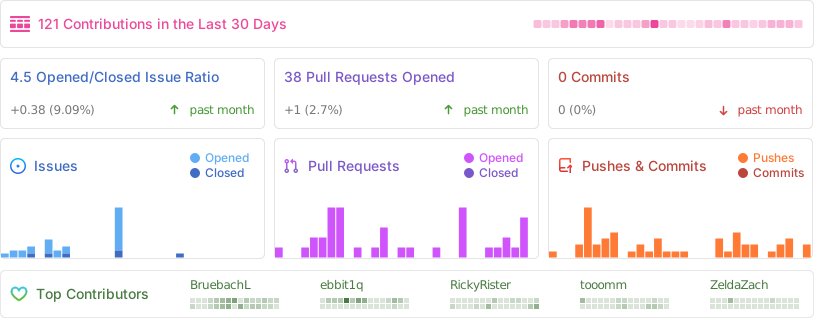
Repository Activity
Code
To contribute code to the project, please review our guidelines first.
We maintain two tags for contributors to easier find issues to potentially work on:
Issues tagged in this way provide a simple way to get started. They don't require much experience to be worked on.
This tag is used for issues that we are looking for somebody to pick up. Often this is for feature suggestions we support, but don't have the time to work on ourselves.


For both tags, we're willing to provide help to contributors in showing them where and how they can make changes, as well as code reviews for submitted changes.
We'll happily advice on how best to implement a feature, or we can show you where the codebase is doing something similar before you get too far along - put a note on an issue you want to discuss more on!
You can also have a look at our Todo List in our Code Documentation or search the repo for \todo comments.
Documentation 
There are various places where useful information for different needs are maintained:
- Official Code Documentation
- Official Wiki
Community supported - Official Webpage
- Official README
This file
Cockatrice tries to use the Google Developer Documentation Style Guide to ensure consistent documentation. We encourage you to improve the documentation by suggesting edits based on this guide.
Translation 
Cockatrice uses Transifex to manage translations. You can help us bring Cockatrice and Oracle to your language and just adjust single wordings right from within your browser by visiting our Transifex project page. The Webatrice web client manages its own translations in its repo.
Check out our Translator FAQ for more information about getting involved, and join a group of hundreds of others!
Build 

Dependencies: (for minimum versions search our CMake file)
Oracle can optionally use some packages to load compressed card files:
Basic compilation steps:
mkdir build
cd build
cmake ..
make
You can then
- Create a Cockatrice installation inside the
releasefolder:make install - Or make an installation package specific to your system:
make package
Note
Detailed compiling instructions can be found in the Cockatrice wiki at Compiling Cockatrice
The following flags (with their non-default values) can be passed to cmake:
| Flag | Description |
|---|---|
-DWITH_SERVER=1 |
Build Servatrice server |
-DWITH_CLIENT=0 |
Don't build Cockatrice client |
-DWITH_ORACLE=0 |
Don't build Oracle card database tool |
-DCMAKE_BUILD_TYPE=Debug |
Compile in debug mode Enables extra logging output, debug symbols, and much more verbose compiler warnings |
-DWARNING_AS_ERROR=0 |
Don't treat compilation warnings as errors in debug mode |
-DUPDATE_TRANSLATIONS=1 |
Configure make to update the translation .ts files for new strings in the source codeNote: make clean will remove the .ts files |
-DTEST=1 |
Enable regression tests Note: make test to run tests, googletest will be downloaded if not available |
Run
Cockatrice is the game client
Oracle fetches card data
Servatrice is the server
Docker
You can build an image & deploy a Servatrice (Cockatrice server) container using Docker and our Dockerfile yourself.
For more details, look into our wiki section on Setting up Servatrice.
You'll also find more hints on our pre-build image there, or the docker-compose file which will configure and run both a MySQL server and Servatrice.
License 
Cockatrice is free software, licensed under the GPLv2.