 d99798111e
Some checks are pending
Build Desktop / Configure (push) Waiting to run
Build Desktop / Debian 13 (push) Blocked by required conditions
Build Desktop / Debian 12 (push) Blocked by required conditions
Build Desktop / Fedora 44 (push) Blocked by required conditions
Build Desktop / Fedora 43 (push) Blocked by required conditions
Build Desktop / Servatrice_Debian 12 (push) Blocked by required conditions
Build Desktop / Ubuntu 26.04 (push) Blocked by required conditions
Build Desktop / Ubuntu 24.04 (push) Blocked by required conditions
Build Desktop / Arch (push) Blocked by required conditions
Build Desktop / macOS 14 (push) Blocked by required conditions
Build Desktop / macOS 15 (push) Blocked by required conditions
Build Desktop / macOS 13 Intel (push) Blocked by required conditions
Build Desktop / macOS 15 Debug (push) Blocked by required conditions
Build Desktop / Windows 10 (push) Blocked by required conditions
Build Docker Image / amd64 & arm64 (push) Waiting to run
* [UserList] Unify friends/online/ignored list with section dividers and add search bar.

Took 31 minutes

Took 7 seconds

* [UserList] Add a light mode theme

Took 12 minutes

Took 11 seconds


Took 5 minutes

Took 2 minutes

* [UserList] Re-sort when a user's online state changes

setUserOnline() flipped the online flag but never re-sorted, so a buddy
who went offline kept the position they had while online and stayed at
the top of the list. Re-sort (and re-apply the filter) whenever the flag
actually changes, mirroring processUserInfo().

Took 10 minutes

* [UserList] Show users in every section they belong to

The sectioned list used one row per user with a priority rule
(ignored > buddy > online), so an online buddy only appeared under
"Buddies" and never in the "Online" list. Sections are now pure
membership views: a user gets one row per section they belong to, so an
online buddy appears under both "Online" and "Buddies".

- Track rows per (section, user) in sectionUsers instead of reparenting
  a single row; the name->primary-row map is kept for external lookups.
- Rebuild, presence and buddy/ignore mutations create/drop rows per
  section instead of moving a single row between sections.
- Dropping one membership no longer removes the user from the other
  sections.

* [UserList] Keyboard navigation for section dividers, popup on selection

Section dividers were not selectable, so arrow-key navigation skipped
them entirely, and the user popup only appeared on hover or click. Now:

- Dividers are selectable, so Up/Down navigation lands on them; they act
  as collapsible headers once focused (Enter/Space toggle, Left/Right
  collapse/expand per tree convention), with a focus indicator drawn by
  the existing delegate.
- The popup follows keyboard selection via currentItemChanged, exactly
  like mouse hover, and closes when the selection moves to a divider or
  leaves the list.
- The popup anchors on the hovered/selected row instead of a user-name
  lookup, so with duplicate rows (online + buddy) it stays attached to
  the row under the mouse/cursor.
- Left-arrow now actually collapses an expanded section divider: the
  collapse branch hardcoded the target expansion state to 'expanded',
  making the key a no-op.
- The user popup no longer flashes through a fade when hopping between
  users (hover or arrow-key navigation): a content swap keeps it opaque,
  and pending show/hide timers are cancelled so an armed hover timer
  cannot override a keyboard-selected row or a pending hide kill the
  newly shown popup.
- Bulk rebuild defers per-row divider-count updates to endBulkLoad(),
  removing the quadratic recount during large online-list loads.
- handleOnlineChangeLeft/handleListRemove skip the sort+filter+repaint
  when nothing actually changed.

* [UserList] Tune the role row gradient colors (dark parity, light mode)

Dark mode is byte-for-byte the pre-branch painter profile, with the
original saturated-left to navy-right fade restored verbatim. Light mode
uses the same language at high tint strength: role rows get colored
fades (0.75/0.65 left to 0.18/0.10 right), and regular users get flat
warm paper cards (AlternateBase) instead of the grey slate.

* [UserList] Deselect the list and close the popup on outside clicks

Clicking anywhere outside the tree, the popup or an open menu now clears
the selection and hides the popup, so a pinned popup does not stay open
when the list loses focus.

- The application-wide event filter watches every mouse press and treats
  a press as inside the list UI only when its target is the tree, the
  popup or an open menu (parent-chain walk), so a click on another list,
  a tab or the window background deselects.
- A hover popup now also closes when the cursor leaves the hovered row.
  The hide timer previously checked whether the cursor was over the
  tree, which is always true over empty list space and section dividers,
  so the popup stayed open after moving off the user.
- Deselection keeps the current item so keyboard navigation is not
  disturbed, and the pinned flag is dropped before hiding so the
  selection-changed handler does not hide twice.

Took 15 minutes

* [UserList] Use an enum for the list sections

The section identifiers were stringly-typed: eleven hardcoded
QStringLiteral comparisons scattered through user_list_widget.cpp, and
the display path (sectionTitle) maps every id through tr() anyway, so
the raw strings were never shown. A typo compiled fine and silently
broke a section.

- enum class Section { Buddy, Online, Ignore } replaces the section
  strings across the sectioned-list API (setSectioned, getSectionIds,
  setSectionExpanded, the sectionExpanded signal and all membership
  helpers), giving compile-time checks at every call site.
- sectionTitle becomes a switch over the enum and the dead raw-string
  fallback is gone.
- The expanded-section state persists the same stable keys via the
  panel widget boundary, so existing settings files survive unchanged.
- The divider reverse lookup in handleSectionExpansion no longer relies
  on an empty-string sentinel from QMap::key; it scans the three
  dividers and bails when the item is not one of them.

Took 12 minutes

# Commit time for manual adjustment:
# Took 2 minutes

---------

Co-authored-by: Lukas Brübach <Bruebach.Lukas@bdosecurity.de>
|
||
|---|---|---|
| .ci | ||
| .github | ||
| .tx | ||
| cmake | ||
| cockatrice | ||
| doc | ||
| libcockatrice_card | ||
| libcockatrice_deck_list | ||
| libcockatrice_filters | ||
| libcockatrice_interfaces | ||
| libcockatrice_models | ||
| libcockatrice_network | ||
| libcockatrice_protocol | ||
| libcockatrice_rng | ||
| libcockatrice_settings | ||
| libcockatrice_utility | ||
| oracle | ||
| servatrice | ||
| tests | ||
| vcpkg@9e593bb18e | ||
| .clang-format | ||
| .cmake-format.json | ||
| .dockerignore | ||
| .gitignore | ||
| .gitmodules | ||
| CMakeLists.txt | ||
| docker-compose.yml | ||
| docker-compose.yml.windows | ||
| Dockerfile | ||
| Doxyfile | ||
| format.sh | ||
| LICENSE | ||
| README.md | ||
| shell.nix | ||
| vcpkg.json | ||

Cockatrice | Download | Related | Community | Contribute | Build | Run
To get started with Cockatrice ⇢ view our webpage

To get support, or suggest changes to the app ⇢ file an issue (How?)
To help with development ⇢ learn how to contribute
Cockatrice
Cockatrice is an open-source, multiplatform application for playing tabletop card games over a network. The program's server design prevents users from manipulating the game for unfair advantage. The client also provides a single-player mode, which allows users to brew while offline.
This project uses C++ and the Qt libraries.
Download 
Downloads are available for stable releases and the current beta version in development.
There is no strict release schedule for either of them.
Latest stable release:


Latest beta version:


While incorporating the latest fixes and features, beta builds may not be stable or contain new bugs! Please report any findings and open new issues when testing them!
Related Repositories
- Magic-Token: File with MtG token data for use in Cockatrice
- Magic-Spoiler: Code to generate MtG spoiler data from MTGJSON for use in Cockatrice
- cockatrice.github.io: Code of the official Cockatrice webpage
- io.github.Cockatrice.cockatrice: Configuration of our Linux
flatpakpackage hosted at Flathub - Webatrice: Web client for Cockatrice servers (TypeScript / React)
Community Resources 
Join our Discord community to connect with other project contributors (#dev channel) or fellow users of the app. Come here to talk about the application, features, or just to hang out.
Important
For support regarding specific servers, please contact that server's admin/mods and use their dedicated communication channels rather than contacting the team building the software.
Contribute
Code | Documentation | Translation
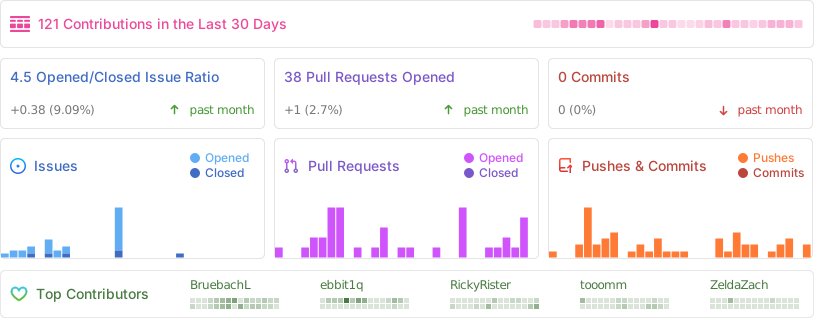
Repository Activity
Code
To contribute code to the project, please review our guidelines first.
We maintain two tags for contributors to easier find issues to potentially work on:
Issues tagged in this way provide a simple way to get started. They don't require much experience to be worked on.
This tag is used for issues that we are looking for somebody to pick up. Often this is for feature suggestions we support, but don't have the time to work on ourselves.


For both tags, we're willing to provide help to contributors in showing them where and how they can make changes, as well as code reviews for submitted changes.
We'll happily advice on how best to implement a feature, or we can show you where the codebase is doing something similar before you get too far along - put a note on an issue you want to discuss more on!
You can also have a look at our Todo List in our Code Documentation or search the repo for \todo comments.
Documentation 
There are various places where useful information for different needs are maintained:
- Official Code Documentation
- Official Wiki
Community supported - Official Webpage
- Official README
This file
Cockatrice tries to use the Google Developer Documentation Style Guide to ensure consistent documentation. We encourage you to improve the documentation by suggesting edits based on this guide.
Translation 
Cockatrice uses Transifex to manage translations. You can help us bring Cockatrice and Oracle to your language and just adjust single wordings right from within your browser by visiting our Transifex project page. The Webatrice web client manages its own translations in its repo.
Check out our Translator FAQ for more information about getting involved, and join a group of hundreds of others!
Build 

Dependencies: (for minimum versions search our CMake file)
Oracle can optionally use some packages to load compressed card files:
Basic compilation steps:
mkdir build
cd build
cmake ..
make
You can then
- Create a Cockatrice installation inside the
releasefolder:make install - Or make an installation package specific to your system:
make package
Note
Detailed compiling instructions can be found in the Cockatrice wiki at Compiling Cockatrice
The following flags (with their non-default values) can be passed to cmake:
| Flag | Description |
|---|---|
-DWITH_SERVER=1 |
Build Servatrice server |
-DWITH_CLIENT=0 |
Don't build Cockatrice client |
-DWITH_ORACLE=0 |
Don't build Oracle card database tool |
-DCMAKE_BUILD_TYPE=Debug |
Compile in debug mode Enables extra logging output, debug symbols, and much more verbose compiler warnings |
-DWARNING_AS_ERROR=0 |
Don't treat compilation warnings as errors in debug mode |
-DUPDATE_TRANSLATIONS=1 |
Configure make to update the translation .ts files for new strings in the source codeNote: make clean will remove the .ts files |
-DTEST=1 |
Enable regression tests Note: make test to run tests, googletest will be downloaded if not available |
Run
Cockatrice is the game client
Oracle fetches card data
Servatrice is the server
Docker
You can build an image & deploy a Servatrice (Cockatrice server) container using Docker and our Dockerfile yourself.
For more details, look into our wiki section on Setting up Servatrice.
You'll also find more hints on our pre-build image there, or the docker-compose file which will configure and run both a MySQL server and Servatrice.
License 
Cockatrice is free software, licensed under the GPLv2.