| .github/workflows | ||
| examples | ||
| repo_to_text | ||
| tests | ||
| .gitignore | ||
| .repo-to-text-settings.yaml | ||
| LICENSE | ||
| MANIFEST.in | ||
| README.md | ||
| requirements.txt | ||
| setup.py | ||

Repository to Text Conversion: repo-to-text command
repo-to-text is an open-source project that converts the structure and contents of a directory (repository) into a single text file. By executing a simple command in the terminal, this tool generates a text representation of the directory, including the output of the tree command and the contents of each file, formatted for easy reading and sharing. This can be very useful for development and debugging with LLM.
Example of Repository to Text Conversion
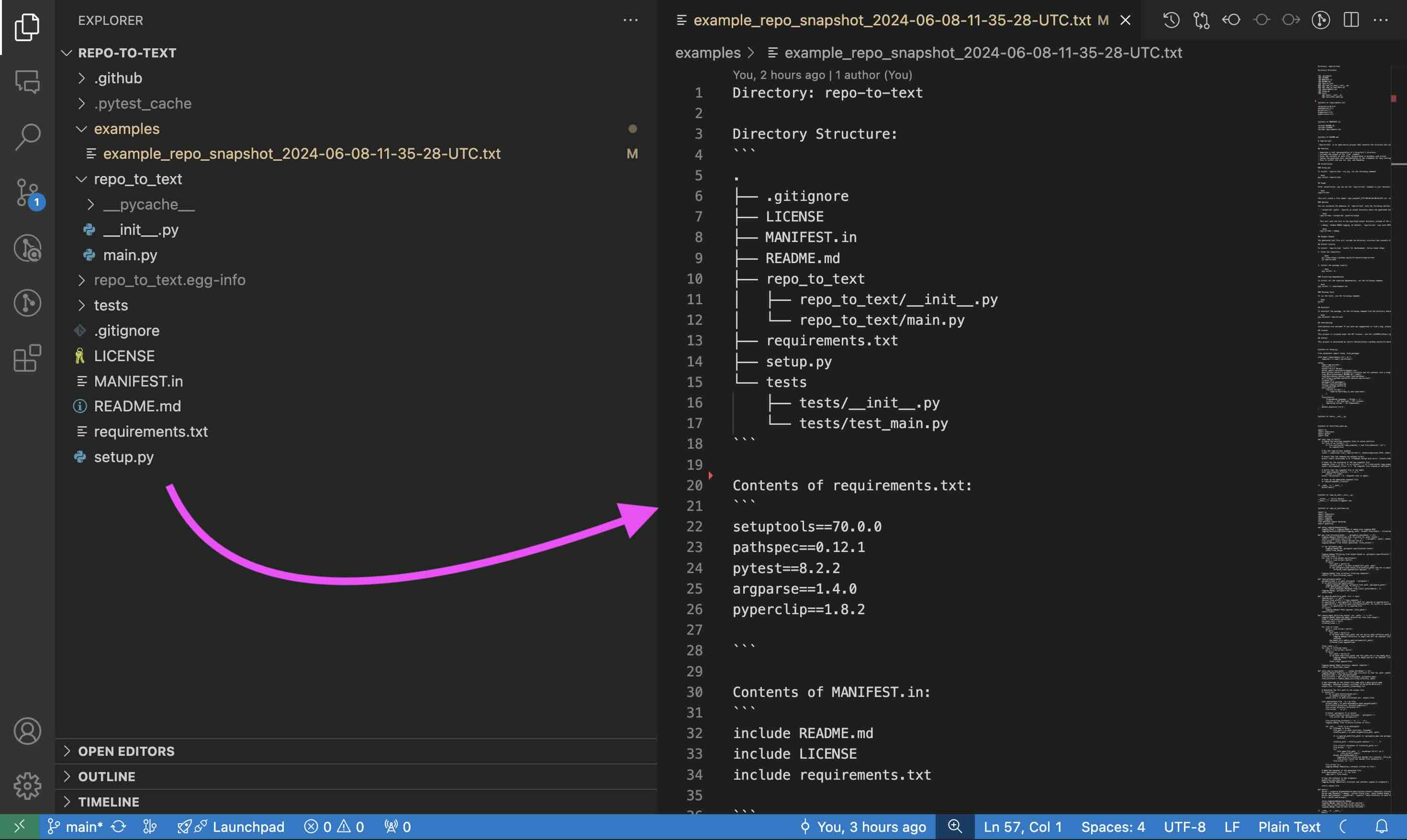
The generated text file will include the directory structure and contents of each file. For a full example, see the example output for this repository.
The same text will appear in your clipboard. You can paste it into a dialog with the LLM and start communicating.
Features
- Generates a text representation of a directory's structure.
- Includes the output of the
treecommand. - Saves the contents of each file, encapsulated in markdown code blocks.
- Copies the generated text representation to the clipboard for easy sharing.
- Easy to install and use via
pip.
Installation
Using pip
To install repo-to-text via pip, run the following command:
pip install repo-to-text
To upgrade to the latest version, use the following command:
pip install --upgrade repo-to-text
Usage
After installation, you can use the repo-to-text command in your terminal. Navigate to the directory you want to convert and run:
repo-to-text
This will create a file named repo-to-text_YYYY-MM-DD-HH-MM-SS-UTC.txt in the current directory with the text representation of the repository. The contents of this file will also be copied to your clipboard for easy sharing.
Options
You can customize the behavior of repo-to-text with the following options:
-
--output-dir <path>: Specify an output directory where the generated text file will be saved. For example:repo-to-text --output-dir /path/to/outputThis will save the file in the specified output directory instead of the current directory.
-
--create-settings: Create a default.repo-to-text-settings.yamlfile with predefined settings. This is useful if you want to start with a template settings file and customize it according to your needs. To create the default settings file, run the following command in your terminal:repo-to-text --create-settingsThis will create a file named
.repo-to-text-settings.yamlin the current directory. If the file already exists, an error will be raised to prevent overwriting. -
--debug: Enable DEBUG logging. By default,repo-to-textruns with INFO logging level. To enable DEBUG logging, use the--debugflag:repo-to-text --debugor to save the debug log to a file:
repo-to-text --debug > debug_log.txt 2>&1 -
input_dir: Specify the directory to process. If not provided, the current directory (.) will be used. For example:repo-to-text /path/to/input_dir
Settings
repo-to-text also supports configuration via a .repo-to-text-settings.yaml file. By default, the tool works without this file, but you can use it to customize what gets included in the final text file.
Creating the Settings File
To create a settings file, add a file named .repo-to-text-settings.yaml at the root of your project with the following content:
# Syntax: gitignore rules

# Ignore files and directories for all sections from gitignore file
# Default: True
gitignore-import-and-ignore: True

# Ignore files and directories for tree
# and "Contents of ..." sections
ignore-tree-and-content:
  - ".repo-to-text-settings.yaml"
  - "examples/"
  - "MANIFEST.in"
  - "setup.py"

# Ignore files and directories for "Contents of ..." section
ignore-content:
  - "README.md"
  - "LICENSE"
  - "tests/"
You can copy this file from the existing example in the project and adjust it to your needs. This file allows you to specify rules for what should be ignored when creating the text representation of the repository.
Configuration Options
- gitignore-import-and-ignore: Ignore files and directories specified in
.gitignorefor all sections. - ignore-tree-and-content: Ignore files and directories for the tree and "Contents of ..." sections.
- ignore-content: Ignore files and directories only for the "Contents of ..." section.
Using these settings, you can control which files and directories are included or excluded from the final text file.
gitignore Rule to Ignore generated files
To ignore the generated text files, add the following lines to your .gitignore file:
repo-to-text_*.txt
Install Locally
To install repo-to-text locally for development, follow these steps:
-
Clone the repository:
git clone https://github.com/kirill-markin/repo-to-text cd repo-to-text -
Install the package locally:
pip install -e .
Installing Dependencies
To install all the required dependencies, run the following command:
pip install -r requirements.txt
Running Tests
To run the tests, use the following command:
pytest
Uninstall
To uninstall the package, run the following command from the directory where the repository is located:
pip uninstall repo-to-text
Contributing
Contributions are welcome! If you have any suggestions or find a bug, please open an issue or submit a pull request.
License
This project is licensed under the MIT License - see the LICENSE file for details.
Contact
This project is maintained by Kirill Markin. For any inquiries or feedback, please contact markinkirill@gmail.com.