mirror of
https://github.com/kirill-markin/repo-to-text.git
synced 2025-12-05 19:12:24 -08:00

303 lines
8.3 KiB
Markdown
303 lines
8.3 KiB
Markdown
# Repository to Text Conversion: repo-to-text command
|
|
|
|
`repo-to-text` converts a directory's structure and contents into a single text file. Run it from the terminal to generate a formatted text representation that includes the directory tree and file contents. This makes it easy to share code with LLMs for development and debugging.
|
|
|
|
## Quick Start
|
|
|
|
1. `pip install repo-to-text` — install the package
|
|
2. `cd <your-repo-dir>` — navigate to the repository directory
|
|
3. `repo-to-text` — run the command, result will be saved in the current directory
|
|
|
|
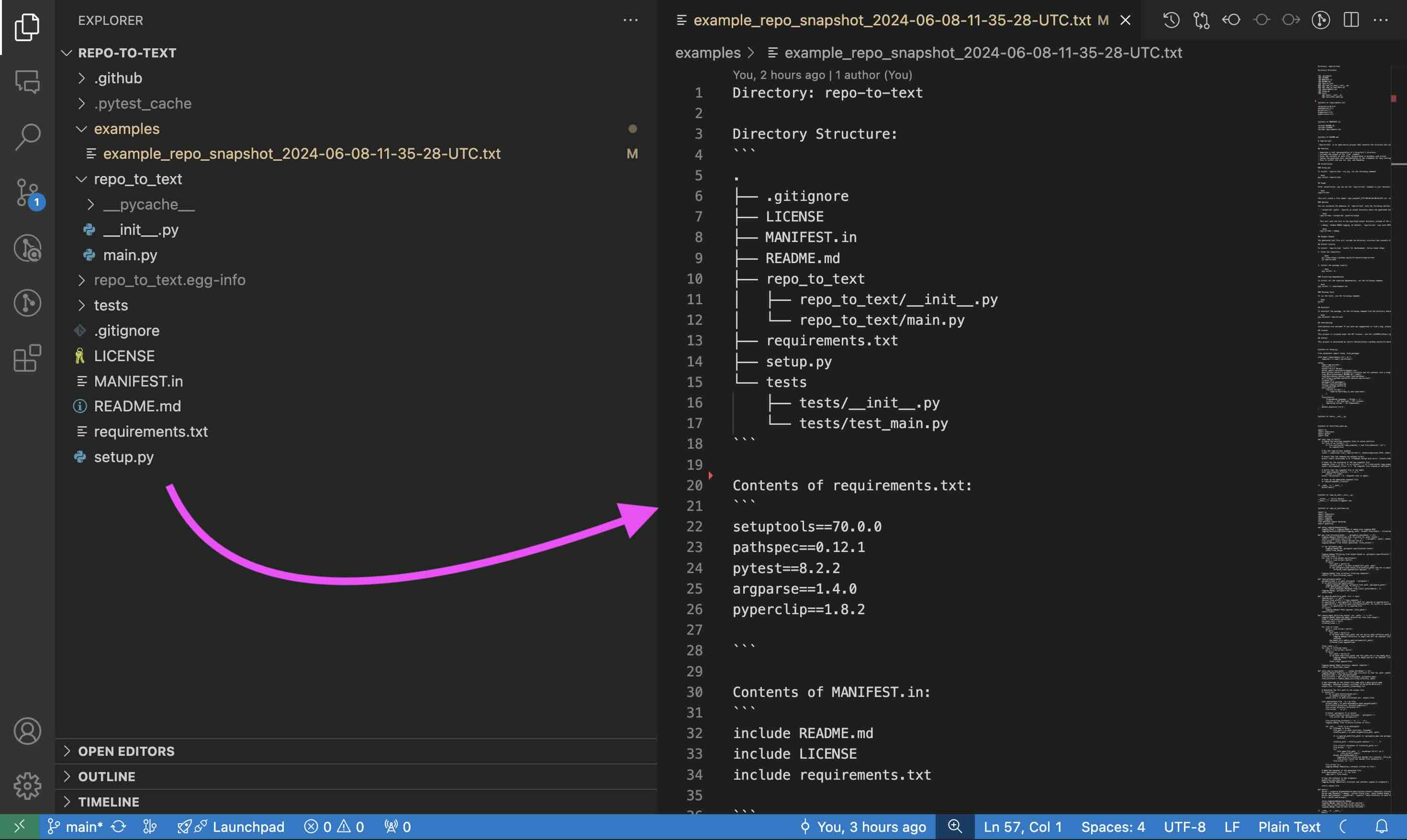
## Example of Repository to Text Conversion
|
|
|
|
|
|
|
|
The generated text file will include the directory structure and contents of each file, using XML tags for better structure:
|
|
|
|
```xml
|
|
<repo-to-text>
|
|
Directory: myproject
|
|
|
|
Directory Structure:
|
|
<directory_structure>
|
|
.
|
|
├── .gitignore
|
|
├── README.md
|
|
└── src
|
|
└── main.py
|
|
</directory_structure>
|
|
|
|
<content full_path="README.md">
|
|
# My Project
|
|
This is a simple project.
|
|
</content>
|
|
|
|
<content full_path="src/main.py">
|
|
def main():
|
|
print("Hello, World!")
|
|
|
|
if __name__ == "__main__":
|
|
main()
|
|
</content>
|
|
|
|
</repo-to-text>
|
|
|
|
For a full example, see the [example output for this repository](https://github.com/kirill-markin/repo-to-text/blob/main/examples/example_repo-to-text_2024-06-09-08-06-31-UTC.txt).
|
|
|
|
## Installation
|
|
|
|
### Using pip
|
|
|
|
To install `repo-to-text` via pip, run the following command:
|
|
|
|
```bash
|
|
pip install repo-to-text
|
|
```
|
|
|
|
To upgrade to the latest version, use the following command:
|
|
|
|
```bash
|
|
pip install --upgrade repo-to-text
|
|
```
|
|
|
|
## Usage
|
|
|
|
After installation, you can use the `repo-to-text` command in your terminal. Navigate to the directory you want to convert and run:
|
|
|
|
```bash
|
|
repo-to-text
|
|
```
|
|
|
|
or
|
|
|
|
```bash
|
|
flatten
|
|
```
|
|
|
|
This will create a file named `repo-to-text_YYYY-MM-DD-HH-MM-SS-UTC.txt` in the current directory with the text representation of the repository. The contents of this file will also be copied to your clipboard for easy sharing.
|
|
|
|
### Options
|
|
|
|
You can customize the behavior of `repo-to-text` with the following options:
|
|
|
|
- `--output-dir <path>`: Specify an output directory where the generated text file will be saved. For example:
|
|
|
|
```bash
|
|
repo-to-text --output-dir /path/to/output
|
|
```
|
|
|
|
This will save the file in the specified output directory instead of the current directory.
|
|
|
|
- `--create-settings` or `--init`: Create a default `.repo-to-text-settings.yaml` file with predefined settings. This is useful if you want to start with a template settings file and customize it according to your needs. To create the default settings file, run the following command in your terminal:
|
|
|
|
```bash
|
|
repo-to-text --create-settings
|
|
```
|
|
|
|
or
|
|
|
|
```bash
|
|
repo-to-text --init
|
|
```
|
|
|
|
This will create a file named `.repo-to-text-settings.yaml` in the current directory. If the file already exists, an error will be raised to prevent overwriting.
|
|
|
|
- `--debug`: Enable DEBUG logging. By default, `repo-to-text` runs with INFO logging level. To enable DEBUG logging, use the `--debug` flag:
|
|
|
|
```bash
|
|
repo-to-text --debug
|
|
```
|
|
|
|
or to save the debug log to a file:
|
|
|
|
```bash
|
|
repo-to-text --debug > debug_log.txt 2>&1
|
|
```
|
|
|
|
- `input_dir`: Specify the directory to process. If not provided, the current directory (`.`) will be used. For example:
|
|
|
|
```bash
|
|
repo-to-text /path/to/input_dir
|
|
```
|
|
|
|
- `--stdout`: Output the generated text to stdout instead of a file. This is useful for piping the output to another command or saving it to a file using shell redirection. For example:
|
|
|
|
```bash
|
|
repo-to-text --stdout > myfile.txt
|
|
```
|
|
|
|
This will write the output directly to `myfile.txt` instead of creating a timestamped file.
|
|
|
|
## Docker Usage
|
|
|
|
### Building and Running
|
|
|
|
1. Build the container:
|
|
|
|
```bash
|
|
docker compose build
|
|
```
|
|
|
|
2. Start a shell session:
|
|
|
|
```bash
|
|
docker compose run --rm repo-to-text
|
|
```
|
|
|
|
Once in the shell, you can run `repo-to-text`:
|
|
|
|
- Process current directory:
|
|
|
|
```bash
|
|
repo-to-text
|
|
```
|
|
|
|
- Process specific directory:
|
|
|
|
```bash
|
|
repo-to-text /home/user/myproject
|
|
```
|
|
|
|
- Use with options:
|
|
|
|
```bash
|
|
repo-to-text --output-dir /home/user/output
|
|
```
|
|
|
|
The container mounts your home directory at `/home/user`, allowing access to all your projects.
|
|
|
|
## Settings
|
|
|
|
`repo-to-text` also supports configuration via a `.repo-to-text-settings.yaml` file. By default, the tool works without this file, but you can use it to customize what gets included in the final text file.
|
|
|
|
### Creating the Settings File
|
|
|
|
To create a settings file, add a file named `.repo-to-text-settings.yaml` at the root of your project with the following content:
|
|
|
|
```yaml
|
|
# Syntax: gitignore rules
|
|
|
|
# Ignore files and directories for all sections from gitignore file
|
|
# Default: True
|
|
gitignore-import-and-ignore: True
|
|
|
|
# Ignore files and directories for tree
|
|
# and contents sections (<content full_path="...">...</content>)
|
|
ignore-tree-and-content:
|
|
- ".repo-to-text-settings.yaml"
|
|
- "examples/"
|
|
- "MANIFEST.in"
|
|
- "setup.py"
|
|
|
|
# Ignore files and directories for contents sections
|
|
ignore-content:
|
|
- "README.md"
|
|
- "LICENSE"
|
|
- "tests/"
|
|
```
|
|
|
|
You can copy this file from the [existing example in the project](https://github.com/kirill-markin/repo-to-text/blob/main/.repo-to-text-settings.yaml) and adjust it to your needs. This file allows you to specify rules for what should be ignored when creating the text representation of the repository.
|
|
|
|
### Configuration Options
|
|
|
|
- **gitignore-import-and-ignore**: Ignore files and directories specified in `.gitignore` for all sections.
|
|
- **ignore-tree-and-content**: Ignore files and directories for the tree and contents sections.
|
|
- **ignore-content**: Ignore files and directories only for the contents sections.
|
|
|
|
Using these settings, you can control which files and directories are included or excluded from the final text file.
|
|
- **maximum_word_count_per_file**: Optional integer. Sets a maximum word count for each output file. If the total content exceeds this limit, the output will be split into multiple files. The split files will be named using the convention `output_filename_part_N.txt`, where `N` is the part number.
|
|
Example:
|
|
```yaml
|
|
# Optional: Maximum word count per output file.
|
|
# If set, the output will be split into multiple files if the total word count exceeds this.
|
|
# maximum_word_count_per_file: 10000
|
|
```
|
|
|
|
### Wildcards and Inclusions
|
|
|
|
Using Wildcard Patterns
|
|
|
|
- `*.ext`: Matches any file ending with .ext in any directory.
|
|
- `dir/*.ext`: Matches files ending with .ext in the specified directory dir/.
|
|
- `**/*.ext`: Matches files ending with .ext in any subdirectory (recursive).
|
|
|
|
If you want to include certain files that would otherwise be ignored, use the ! pattern:
|
|
|
|
```yaml
|
|
ignore-tree-and-content:
|
|
- "*.txt"
|
|
- "!README.txt"
|
|
```
|
|
|
|
## gitignore Rule to Ignore generated files
|
|
|
|
To ignore the generated text files, add the following lines to your `.gitignore` file:
|
|
|
|
```gitignore
|
|
repo-to-text_*.txt
|
|
```
|
|
|
|
## Install Locally
|
|
|
|
To install `repo-to-text` locally for development, follow these steps:
|
|
|
|
1. Clone the repository:
|
|
|
|
```bash
|
|
git clone https://github.com/kirill-markin/repo-to-text
|
|
cd repo-to-text
|
|
```
|
|
|
|
2. Install the package with development dependencies:
|
|
|
|
```bash
|
|
pip install -e ".[dev]"
|
|
```
|
|
|
|
### Requirements
|
|
|
|
- Python >= 3.6
|
|
- Core dependencies:
|
|
- setuptools >= 70.0.0
|
|
- pathspec >= 0.12.1
|
|
- argparse >= 1.4.0
|
|
- PyYAML >= 6.0.1
|
|
|
|
### Development Dependencies
|
|
|
|
For development, additional packages are required:
|
|
|
|
- pytest >= 8.2.2
|
|
- black
|
|
- mypy
|
|
- isort
|
|
- build
|
|
- twine
|
|
|
|
### Running Tests
|
|
|
|
To run the tests, use the following command:
|
|
|
|
```bash
|
|
pytest
|
|
```
|
|
|
|
## Uninstall
|
|
|
|
To uninstall the package, run the following command from the directory where the repository is located:
|
|
|
|
```bash
|
|
pip uninstall repo-to-text
|
|
```
|
|
|
|
## Contributing
|
|
|
|
Contributions are welcome! If you have any suggestions or find a bug, please open an issue or submit a pull request.
|
|
|
|
## License
|
|
|
|
This project is licensed under the MIT License - see the [LICENSE](https://github.com/kirill-markin/repo-to-text/blob/main/LICENSE) file for details.
|
|
|
|
## Contact
|
|
|
|
This project is maintained by [Kirill Markin](https://github.com/kirill-markin). For any inquiries or feedback, please contact [markinkirill@gmail.com](mailto:markinkirill@gmail.com).
|