mirror of
https://github.com/kirill-markin/repo-to-text.git
synced 2025-12-06 03:22:23 -08:00

246 lines
6.9 KiB
Markdown
246 lines
6.9 KiB
Markdown
# Repository to Text Conversion: repo-to-text command
|
|
|
|
`repo-to-text` converts a directory's structure and contents into a single text file. Run it from the terminal to generate a formatted text representation that includes the directory tree and file contents. This makes it easy to share code with LLMs for development and debugging.
|
|
|
|
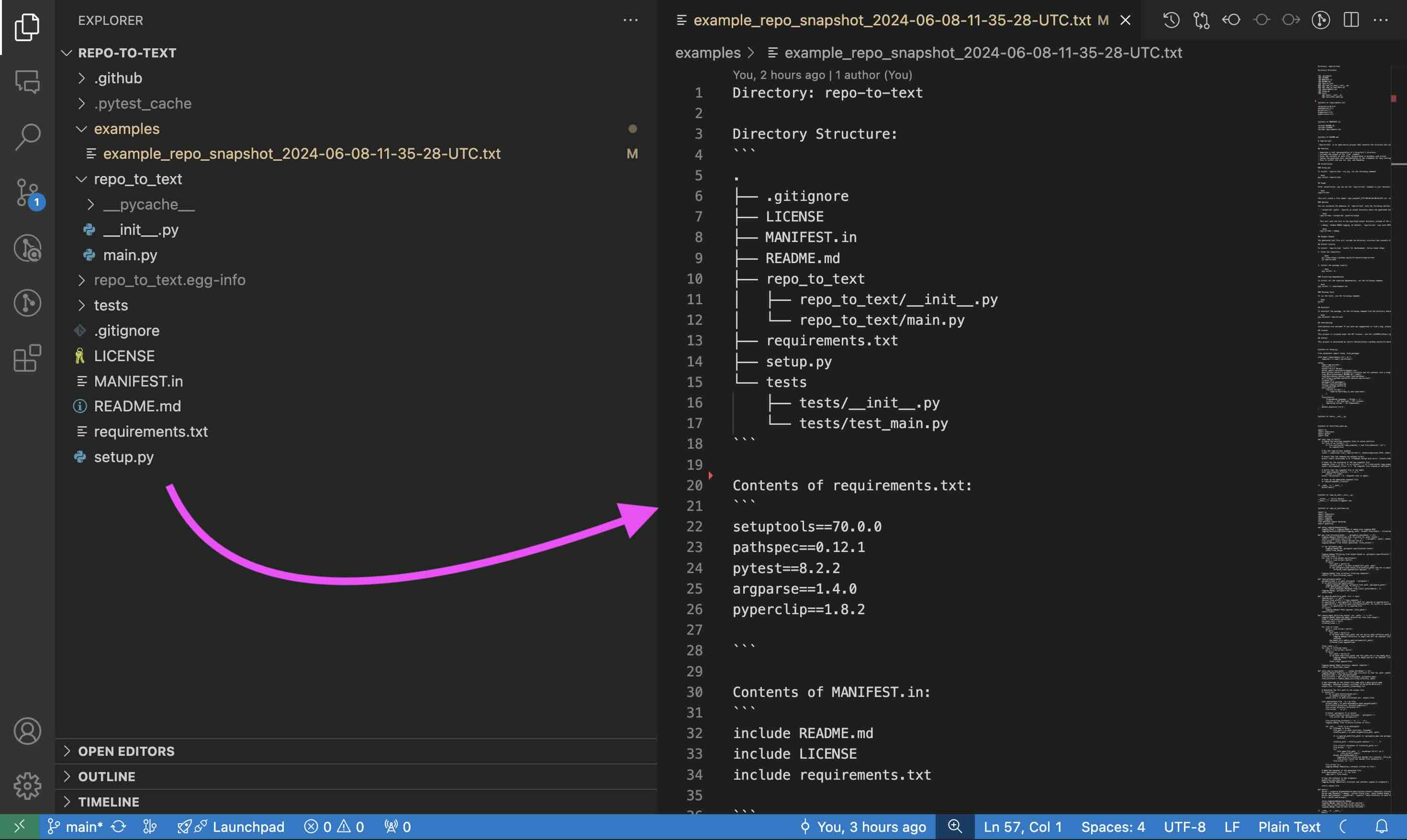
## Example of Repository to Text Conversion
|
|
|
|
|
|
|
|
The generated text file will include the directory structure and contents of each file. For a full example, see the [example output for this repository](https://github.com/kirill-markin/repo-to-text/blob/main/examples/example_repo-to-text_2024-06-09-08-06-31-UTC.txt).
|
|
|
|
## Quick Start
|
|
|
|
Run the following command in the terminal:
|
|
|
|
```bash
|
|
pip install repo-to-text
|
|
```
|
|
|
|
then open your repository and run the following command:
|
|
|
|
```bash
|
|
repo-to-text
|
|
```
|
|
|
|
Resulting file will be saved in the current directory.
|
|
|
|
## Features
|
|
|
|
- Converts directory structure to text
|
|
- Shows file tree
|
|
- Includes file contents
|
|
- Copies output to clipboard
|
|
- Simple pip installation
|
|
|
|
## Installation
|
|
|
|
### Using pip
|
|
|
|
To install `repo-to-text` via pip, run the following command:
|
|
|
|
```bash
|
|
pip install repo-to-text
|
|
```
|
|
|
|
To upgrade to the latest version, use the following command:
|
|
|
|
```bash
|
|
pip install --upgrade repo-to-text
|
|
```
|
|
|
|
## Usage
|
|
|
|
After installation, you can use the `repo-to-text` command in your terminal. Navigate to the directory you want to convert and run:
|
|
|
|
```bash
|
|
repo-to-text
|
|
```
|
|
|
|
or
|
|
|
|
```bash
|
|
flatten
|
|
```
|
|
|
|
This will create a file named `repo-to-text_YYYY-MM-DD-HH-MM-SS-UTC.txt` in the current directory with the text representation of the repository. The contents of this file will also be copied to your clipboard for easy sharing.
|
|
|
|
### Options
|
|
|
|
You can customize the behavior of `repo-to-text` with the following options:
|
|
|
|
- `--output-dir <path>`: Specify an output directory where the generated text file will be saved. For example:
|
|
|
|
```bash
|
|
repo-to-text --output-dir /path/to/output
|
|
```
|
|
|
|
This will save the file in the specified output directory instead of the current directory.
|
|
|
|
- `--create-settings` or `--init`: Create a default `.repo-to-text-settings.yaml` file with predefined settings. This is useful if you want to start with a template settings file and customize it according to your needs. To create the default settings file, run the following command in your terminal:
|
|
|
|
```bash
|
|
repo-to-text --create-settings
|
|
```
|
|
|
|
or
|
|
|
|
```bash
|
|
repo-to-text --init
|
|
```
|
|
|
|
This will create a file named `.repo-to-text-settings.yaml` in the current directory. If the file already exists, an error will be raised to prevent overwriting.
|
|
|
|
- `--debug`: Enable DEBUG logging. By default, `repo-to-text` runs with INFO logging level. To enable DEBUG logging, use the `--debug` flag:
|
|
|
|
```bash
|
|
repo-to-text --debug
|
|
```
|
|
|
|
or to save the debug log to a file:
|
|
|
|
```bash
|
|
repo-to-text --debug > debug_log.txt 2>&1
|
|
```
|
|
|
|
- `input_dir`: Specify the directory to process. If not provided, the current directory (`.`) will be used. For example:
|
|
|
|
```bash
|
|
repo-to-text /path/to/input_dir
|
|
```
|
|
|
|
- `--stdout`: Output the generated text to stdout instead of a file. This is useful for piping the output to another command or saving it to a file using shell redirection. For example:
|
|
|
|
```bash
|
|
repo-to-text --stdout > myfile.txt
|
|
```
|
|
|
|
This will write the output directly to `myfile.txt` instead of creating a timestamped file.
|
|
|
|
## Settings
|
|
|
|
`repo-to-text` also supports configuration via a `.repo-to-text-settings.yaml` file. By default, the tool works without this file, but you can use it to customize what gets included in the final text file.
|
|
|
|
### Creating the Settings File
|
|
|
|
To create a settings file, add a file named `.repo-to-text-settings.yaml` at the root of your project with the following content:
|
|
|
|
```yaml
|
|
# Syntax: gitignore rules
|
|
|
|
# Ignore files and directories for all sections from gitignore file
|
|
# Default: True
|
|
gitignore-import-and-ignore: True
|
|
|
|
# Ignore files and directories for tree
|
|
# and "Contents of ..." sections
|
|
ignore-tree-and-content:
|
|
- ".repo-to-text-settings.yaml"
|
|
- "examples/"
|
|
- "MANIFEST.in"
|
|
- "setup.py"
|
|
|
|
# Ignore files and directories for "Contents of ..." section
|
|
ignore-content:
|
|
- "README.md"
|
|
- "LICENSE"
|
|
- "tests/"
|
|
```
|
|
|
|
You can copy this file from the [existing example in the project](https://github.com/kirill-markin/repo-to-text/blob/main/.repo-to-text-settings.yaml) and adjust it to your needs. This file allows you to specify rules for what should be ignored when creating the text representation of the repository.
|
|
|
|
### Configuration Options
|
|
|
|
- **gitignore-import-and-ignore**: Ignore files and directories specified in `.gitignore` for all sections.
|
|
- **ignore-tree-and-content**: Ignore files and directories for the tree and "Contents of ..." sections.
|
|
- **ignore-content**: Ignore files and directories only for the "Contents of ..." section.
|
|
|
|
Using these settings, you can control which files and directories are included or excluded from the final text file.
|
|
|
|
### Wildcards and Inclusions
|
|
|
|
Using Wildcard Patterns
|
|
|
|
- `*.ext`: Matches any file ending with .ext in any directory.
|
|
- `dir/*.ext`: Matches files ending with .ext in the specified directory dir/.
|
|
- `**/*.ext`: Matches files ending with .ext in any subdirectory (recursive).
|
|
|
|
If you want to include certain files that would otherwise be ignored, use the ! pattern:
|
|
|
|
```yaml
|
|
ignore-tree-and-content:
|
|
- "*.txt"
|
|
- "!README.txt"
|
|
```
|
|
|
|
## gitignore Rule to Ignore generated files
|
|
|
|
To ignore the generated text files, add the following lines to your `.gitignore` file:
|
|
|
|
```gitignore
|
|
repo-to-text_*.txt
|
|
```
|
|
|
|
## Install Locally
|
|
|
|
To install `repo-to-text` locally for development, follow these steps:
|
|
|
|
1. Clone the repository:
|
|
|
|
```bash
|
|
git clone https://github.com/kirill-markin/repo-to-text
|
|
cd repo-to-text
|
|
```
|
|
|
|
2. Install the package with development dependencies:
|
|
|
|
```bash
|
|
pip install -e ".[dev]"
|
|
```
|
|
|
|
### Requirements
|
|
|
|
- Python >= 3.6
|
|
- Core dependencies:
|
|
- setuptools >= 70.0.0
|
|
- pathspec >= 0.12.1
|
|
- argparse >= 1.4.0
|
|
- PyYAML >= 6.0.1
|
|
|
|
### Development Dependencies
|
|
|
|
For development, additional packages are required:
|
|
|
|
- pytest >= 8.2.2
|
|
- black
|
|
- mypy
|
|
- isort
|
|
- build
|
|
- twine
|
|
|
|
### Running Tests
|
|
|
|
To run the tests, use the following command:
|
|
|
|
```bash
|
|
pytest
|
|
```
|
|
|
|
## Uninstall
|
|
|
|
To uninstall the package, run the following command from the directory where the repository is located:
|
|
|
|
```bash
|
|
pip uninstall repo-to-text
|
|
```
|
|
|
|
## Contributing
|
|
|
|
Contributions are welcome! If you have any suggestions or find a bug, please open an issue or submit a pull request.
|
|
|
|
## License
|
|
|
|
This project is licensed under the MIT License - see the [LICENSE](https://github.com/kirill-markin/repo-to-text/blob/main/LICENSE) file for details.
|
|
|
|
## Contact
|
|
|
|
This project is maintained by [Kirill Markin](https://github.com/kirill-markin). For any inquiries or feedback, please contact [markinkirill@gmail.com](mailto:markinkirill@gmail.com).
|